
Projects isn't just a better checklist: how Ailo's workflow tools differ from legacy software

Liz Pollock
02 January 2026
It's 2pm on a Tuesday, and you've got eight tabs open across two screens. Your property management system is in one tab, your inbox in another, a supplier's quote in a PDF viewer in a third. You're switching between windows trying to remember which owner you need to call back about that maintenance quote, and whether you've already sent the entry notice for tomorrow's inspection.
For most property management software platforms, the approach to workflow management has been the same for years: build tools for different types of work (inspections here, repairs there, lease renewals over here), then add a task or checklist feature on top to help you track what needs doing.
It's more sophisticated than the paper-based systems of the past, but the fundamental problem remains: your tasks live separately from your work. You check a list to see what needs doing, then navigate away to actually do it, then remember to come back and update the list.
Ailo's Projects takes a different approach – one that's worth understanding if you're evaluating whether to make a platform change.
The challenge with traditional task systems
Bernadette, one of Ailo's account managers who works with agencies daily, described what she recently saw in an office.
"I was visiting an office on Friday, and they had a new staff member start and he had about eight tabs open because he wasn't using my actions in projects," she said.
"So I said to him, 'You seem to have a lot of tabs open, why?' And he said, 'Oh, well, I'm working on this, and I'm working on this, and I'm working on this, and I'm waiting for this owner to get back to me on this.'"
Multiple screens. Dozens of tabs. Mental load tracking where everything is.
The issue isn't that traditional task systems don't work. Many have sophisticated features like templates, automation, and visual boards.
But here's what happens in practice: you still need to leave your task list to do the actual work. You click a task that says "send work order to supplier," but then you navigate away to find the property, pull up the communication thread, compose the message, attach the quote, and hopefully remember to come back and tick the task as done.
You're managing a list about your work, not doing your work through the list.

“The difference with Ailo compared to legacy software is that we don't give you a checklist to tick off so you can do the work somewhere else. In Ailo, you actually do the work as you go inside your project. No tab-jumping!”
— Bernadette O'Sullivan, account manager at Ailo
When the workflow IS the task management
Ailo took a fundamentally different approach when building projects. We didn't think of it as a task management layer added on top of property management functions. We thought of it as the work itself.
Lav, one of Ailo's product leaders, explained: "Property manager workflows can be really complex – all the steps they need to take, the collaboration required, etc. We built projects to support that complexity."
What does that actually mean when you're in the middle of coordinating a repair?
It means everything you need to complete that repair lives inside the one view. You're not going to a separate messages tab to send a work order – you send it from within the Project. You're not navigating to documents to attach the quote – it's right there. When the supplier responds, that response appears in the Project timeline. When you need to update the owner, their entire communication history for this specific repair is already loaded.
"On platforms where tasks are layered on top, you can effectively ignore that layer and do other things. On Ailo, you're actually doing the work as you go through the project, in the project," Lav said.

“On Ailo, you're doing your work through the Project, not checking boxes about work you did somewhere else.”
— Lav Lalwani, Senior Product Manager at Ailo
What this means for how your team actually works
The real test of any workflow system isn't how it looks in a demo. It's how property managers describe their day after using it for months. Here's what that looks like in practice:
1. It's obvious what to do next, no hunting for it
In traditional task systems, you might set a reminder to follow up on a repair in 48 hours. But when that reminder appears, you still need to go find the repair, check where it's up to, dig through messages to see what the last communication was.
In projects, when that 48-hour action appears in My Actions, everything you need is right there. The work order you sent. The supplier's response. The owner's preferences. All the context required to actually do the follow-up, not just be reminded it exists.
Bernadette explained: "You're not having to go into a part of the platform and look for what repairs you need to follow up on today. It just tells you."
That's the key difference. Traditional systems tell you a reminder exists. projects tells you what to do and gives you everything needed to do it—in one place.

“Everyday I used to hear, 'I have too many emails, I can't get on top of my work, and I can't leave the office to do any inspections'. I don't hear that anymore. Prioritising is so much easier now.”
— Rob Zappia, General Manager at McGrath on the Lower North Shore
2. Your team can actually step in when you're away
Taking time off in property management has historically meant one of two things: the person covering you drowns trying to manage double their portfolio, or work doesn't get done and you spend weeks catching up.
Bernadette described how projects changes this: "You can just allocate those 10 actions that need to be done next week into someone else's My Actions and say, 'Can you take care of those 10 things? That's it.' And the person staying behind goes, 'That's it, you want me to do 10 things?' Because usually they're expecting to manage double the workload."
The person covering you isn't drowning. You're not coming back to chaos. Your investors and renters still get great service, because the system showed exactly what needed attention and when.
Cathy, a head of department on QLD's Gold Coast, explained the visibility this creates as game-changing.

“With projects, I can step in at any time and see where my staff are at. There's no, 'what's her password? How do I get in it?' I can see every aspect of the business: owners, tenants, projects, maintenance. Everything is right in front of you.”
— Cathy Page, Property Management Head of Department at LJ Hooker Nerang
3. Property managers finally get proper sleep
Renee, a property manager in WA, described what changed for her:
"There are much easier ways to property manage - and Ailo is the way to do it. I swear overnight I became a brand new woman with an even bigger drive for success," she said.
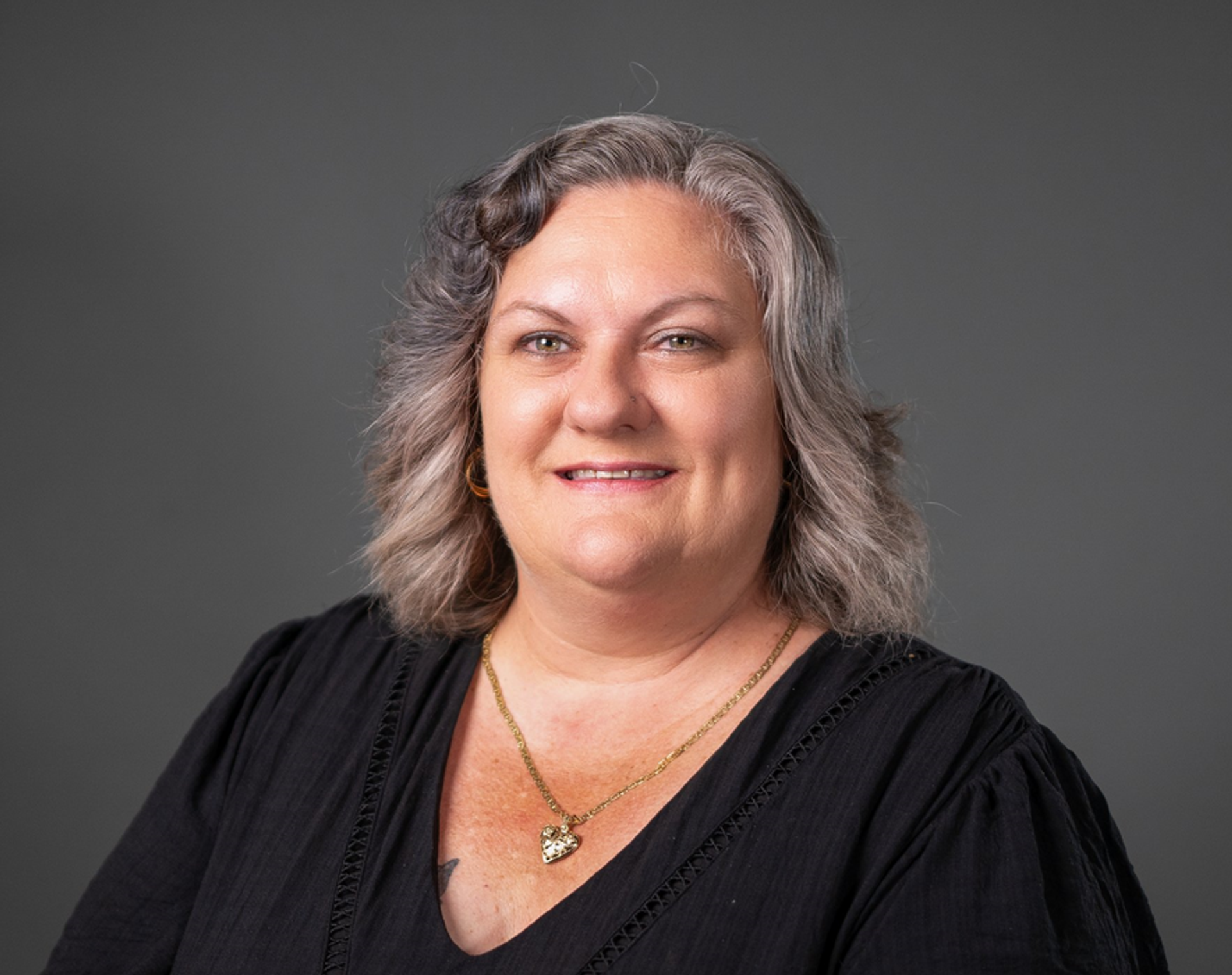
“Now that I have projects, I had the best sleep because I didn't have to remember what I needed to do today – Ailo remembered for me.”
— Renee Morrison, Property Manager at Freedom Palmerston
That's not about having a better to-do list. It's about trusting the system to hold everything you need, exactly when you need it, without you having to remember to go look for it.
4. Overdue actions actually mean something
Bernadette takes a harder line on overdue actions than most, and it's only possible because in Projects, actions genuinely represent the work being done—not forgotten checkboxes.
"If your actions and projects are set up and triggered the way you want your business to run, overdue actions tell you something important," she said.
"Either the work genuinely isn't getting done, or the person needs support. That visibility helps you have the right conversation – whether that's celebrating wins or offering training."
How projects differs from traditional task management

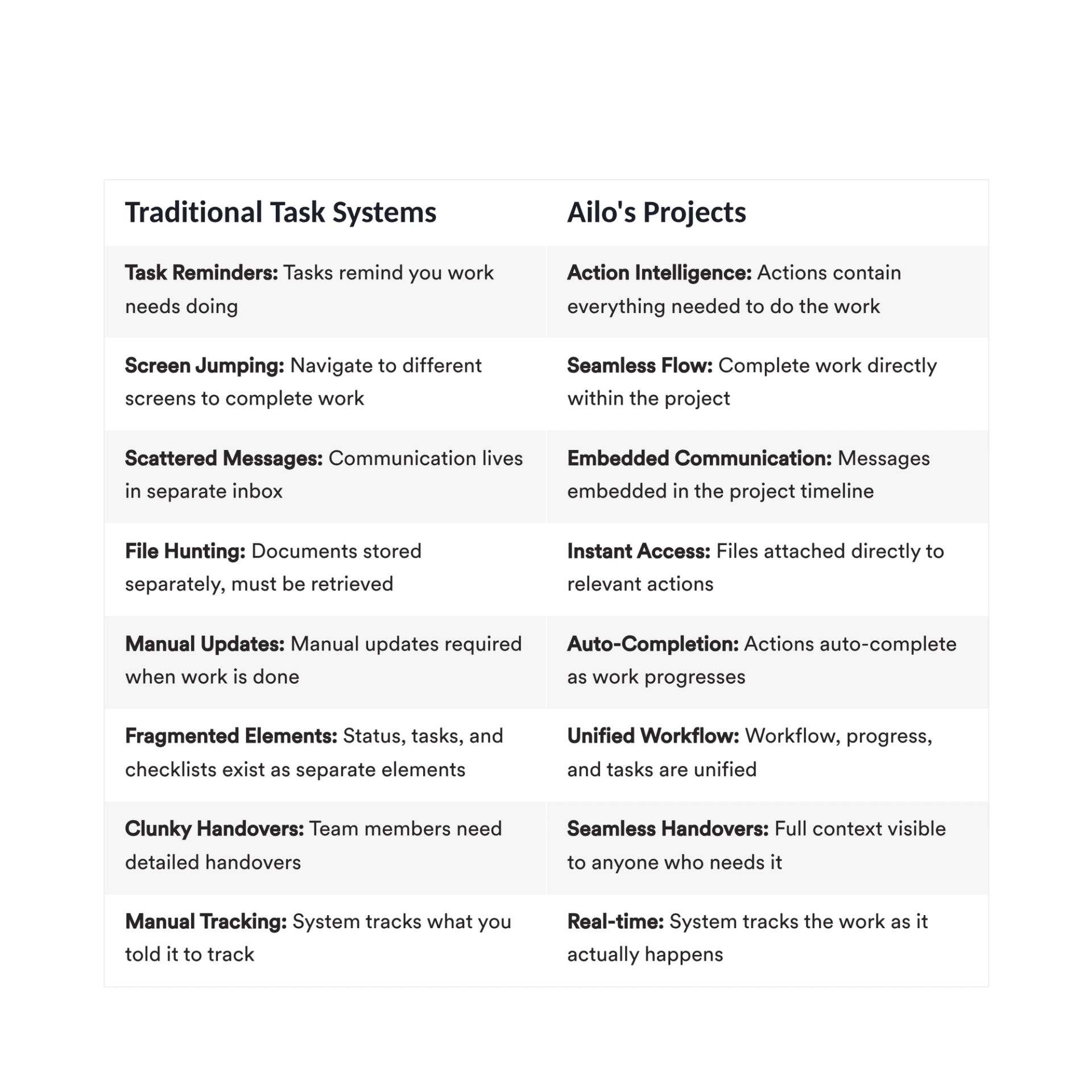
As Lav put it: "If you go to a repair project, it will have the work order there, it will have the quote request there because that is the way you sent it. You can trust it to have everything you ever need around a workflow."
What's different about tasks and workflows in legacy platforms
Many property management platforms have worked to improve their task features significantly recently. Some now offer visual Kanban boards, automation capabilities that trigger tasks based on events, and integration between checklists and workflows.
These are genuine improvements that make task management more sophisticated than it was even a year ago.
But here's what fundamentally hasn't changed in these systems: tasks, statuses, and the actual work remain separate things that you manually coordinate. Completing a task doesn't automatically update the property status. Sending a message doesn't mark the related task as done. You're still assembling the complete picture from different places.

“Since moving to Ailo and using projects it's just... mind blowing. Everything is there and it's assigned to somebody, it's allocated. Even the fact that you can customise, it is fantastic.”
— Dina, a property manager in Sydney
The shift isn't just technical, it's cultural
When Bernadette trains property managers on projects, she's noticed something important about successful transitions.
"If you can walk out of the office on day one and your property managers go, 'Oh my god, that was so easy. I set up all my routines, I pulled over some repairs and I did a lease renewal' – that's a completely different energy than when they're overwhelmed saying, 'I don't even know where to start.'"
The difference isn't about technical ability. It's about preparation and support.
The agencies that succeed with projects aren't just learning new software. They're embracing a different philosophy about how property management work should flow, and Ailo's team helps you make that shift without the chaos.
Here's what actually changes:
- From reactive to proactive. Not because you're trying harder, but because the system shows you what needs doing before problems escalate. You're not firefighting anymore—you're staying ahead.
- From individual knowledge to shared workflows. Not because you have better checklists, but because everyone's following the same embedded processes. When someone's away, the work doesn't stop—because the system holds the knowledge, not just the person.
- From reporting on work to work that reports itself. Not because you're generating more reports, but because the work itself creates the visibility. Your team leads can see where things are at without asking, and property managers can prove their value without extra admin.
This kind of change can feel daunting. That's why Ailo doesn't just hand you software and wish you luck. The onboarding journey is designed to set your projects up the way your business actually runs, train your team on the philosophy (not just the features), and make sure you walk out of day one with that "oh my god, this is easy" energy—not the overwhelmed kind.
Peter, a business owner on the Gold Coast, experienced this consolidation firsthand as he grew from 0 to 1,200 properties:

“Doing away with spreadsheets and Trello boards and putting our projects into one space in Ailo, we are able to communicate quicker and easier to our clients, and it's made our lives a lot easier!”
— Peter Catanzariti, a business owner on QLD's Gold Coast
So which approach is right for your agency?
If you're evaluating property management platforms, the question isn't "which has better task features?" Many platforms now have robust task capabilities.
The real question is: do you want to keep coordinating your work, or do you want to just do your work?
For agencies looking for incremental improvements to their current way of working, enhanced task features in existing platforms offer real value. Better organisation, more automation, clearer visibility.
But if you're ready for something more—if you want your team to stop firefighting and start getting ahead, if you want everyone to have visibility without constant check-ins, if you want property managers to actually take holidays without dread—projects is built for that.
The property managers who've made the switch? They're the ones telling Bernadette they finally sleep through the night. They've gone from three screens to one laptop. They take time off without coming back to chaos.
Rob's team on Sydney's Lower North Shore doesn't hear "I have too many emails" anymore. Renee woke up feeling like "a brand new woman with an even bigger drive for success." Cathy can see where her staff are at without jumping on their computers.
That's not because they have a better to-do list. It's because they're not juggling a to-do list at all—they're just doing the work, and the system takes care of the rest.
Want to see how projects actually works in practice?
Get a demo and we'll show you the difference between managing tasks on a checklist and getting work done faster, without the mental load, within Projects.
FAQs: Projects in Ailo
What's the difference between task management features in legacy software and Ailo's projects?
How do team leaders and managers use projects?
Can you easily reassign different projects to different team members?
Are emails linked to projects?
What happens during onboarding? How long does it take to get set up?
See how teams use the Ailo platform
Catherine has 7 years experience as a property manager under her belt and can share first hand what it's like to work with your team on the Ailo platform.
