18.11.26 | Release Notes

Ailo
18 November 2026
What's New in Ailo
18.11.26
Rent carries over when a tenancy transfers
What: When you complete a Change of ownership or Change of shared tenancy, rent keeps running on its existing cycle and any paid-ahead balance moves across with a clear label.
Why: Renters keep paying on the same schedule, and you can see exactly what moved between tenancies without raising manual adjustments. Paid-in-advance tenancies are also much easier to follow and vacate after a transfer.
How: Complete the Change of ownership or Change of shared tenancy as usual. Rent on the new tenancy starts on the tenancy change date and continues the old cycle. If the change falls mid-cycle, the first period covers only the days left, then rent returns to the usual due day and amount. For example, a Thursday change on $700 a week due Mondays is $400 for Thursday to Sunday, then $700 from Monday.
Paid-ahead rent shows as a credit on the new tenancy, labelled "Balance carried forward from transferred tenancy", with a matching debit on the old tenancy. You'll find both under Property > Tenancy tab > Manage > Manage rent > Rent adjustments. For the former tenancy, go to Former tenancies > Manage. Renters see the credit as a rent adjustment in their Rent tab.
If the renters are in arrears, a Change of shared tenancy clears the arrears from the old tenancy with a credit, and new rent starts the day after the old paid-to date. For a Change of ownership, the arrears stay with the former tenancy and the new tenancy starts the day after settlement. When you download the tenancy history, you can choose Include all tenancies or Only current tenancy.
Choose which emails sync into Ailo
What: Add contacts from services like DocuSign, Xero or Workmate to a new email allowlist, and their emails sync straight into Ailo Messages.
Why: Ailo already syncs your emails with renters, investors, suppliers and leads. But emails like signed leases coming back from DocuSign stayed in your Gmail or Outlook. Now they land in Messages too, so you have one place to look and a complete history for every property.
How: Go to Email privacy settings and add the contacts you want to the new allowlist. Emails from those contacts start appearing in Messages alongside your renter, investor, supplier and lead conversations. Only emails from contacts on your allowlist are added, so the rest of your inbox stays private. Your existing blocklist works just as it does today.


More control over emergency tradespeople

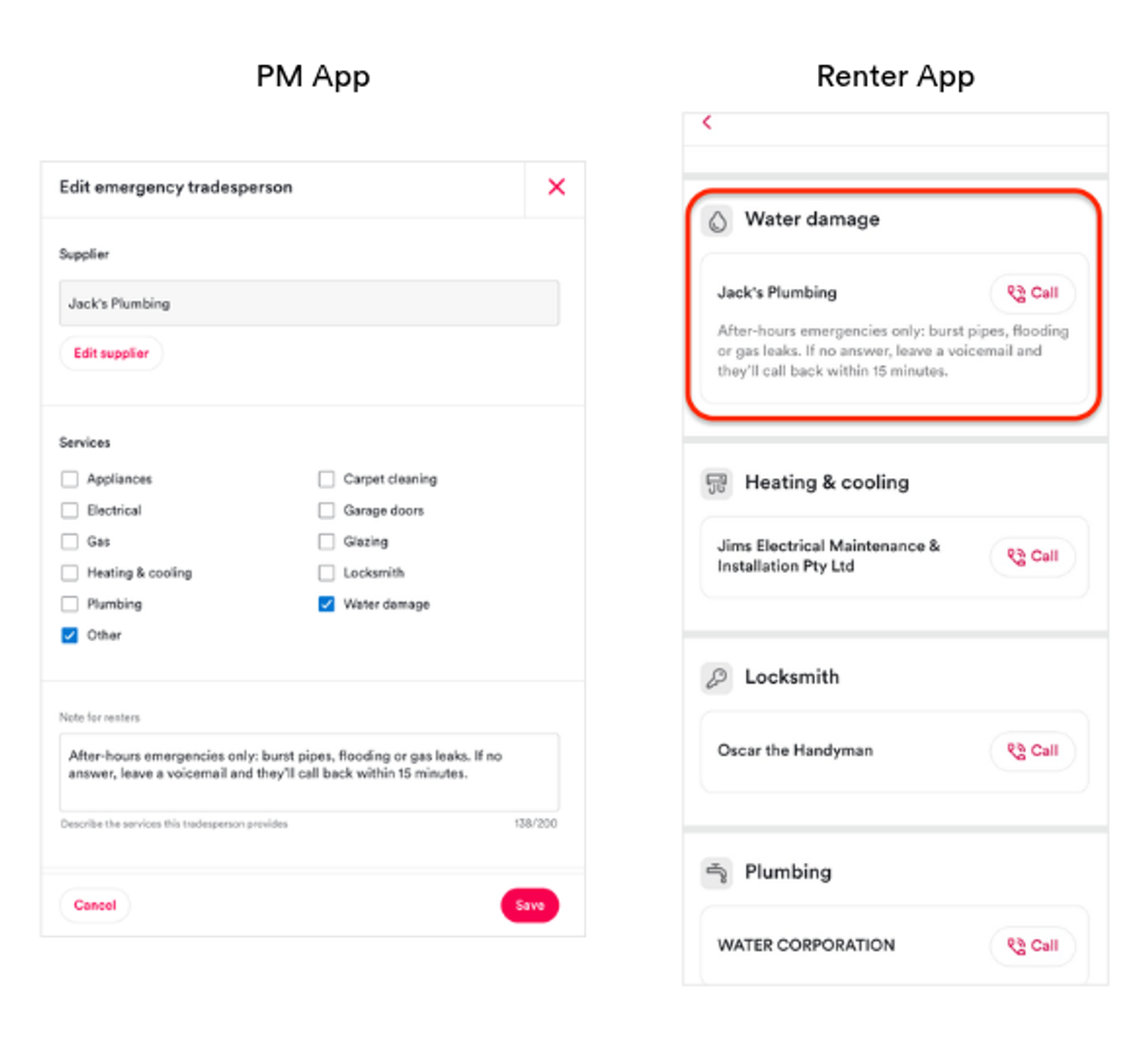
What: Add Water damage and Other emergency tradespeople, give each one a short note renters can see, and choose which phone number renters call.
Why: When something goes wrong after hours, renters need to reach the right person fast. Now you can list a water damage provider, tell renters what each tradesperson is for, and point calls to the number that actually gets answered, like an office line that redirects to whoever is on call.
How: When you add or edit an emergency tradesperson, choose the new Water damage or Other category, add a short note for renters, and pick whether renters call the supplier's mobile or work number. Renters see the note and the right number in the Ailo app.
Agency wallet transfer details
What: Your agency wallet now shows where transfers are paid to and how often they happen.
Why: You can check where your agency's money goes and when at a glance, without needing to ask support.
How: Open your agency wallet in Ailo to see the payment destination (with the bank account partly hidden for security) and the transfer frequency.


Outstanding bills in vacate tenancy projects

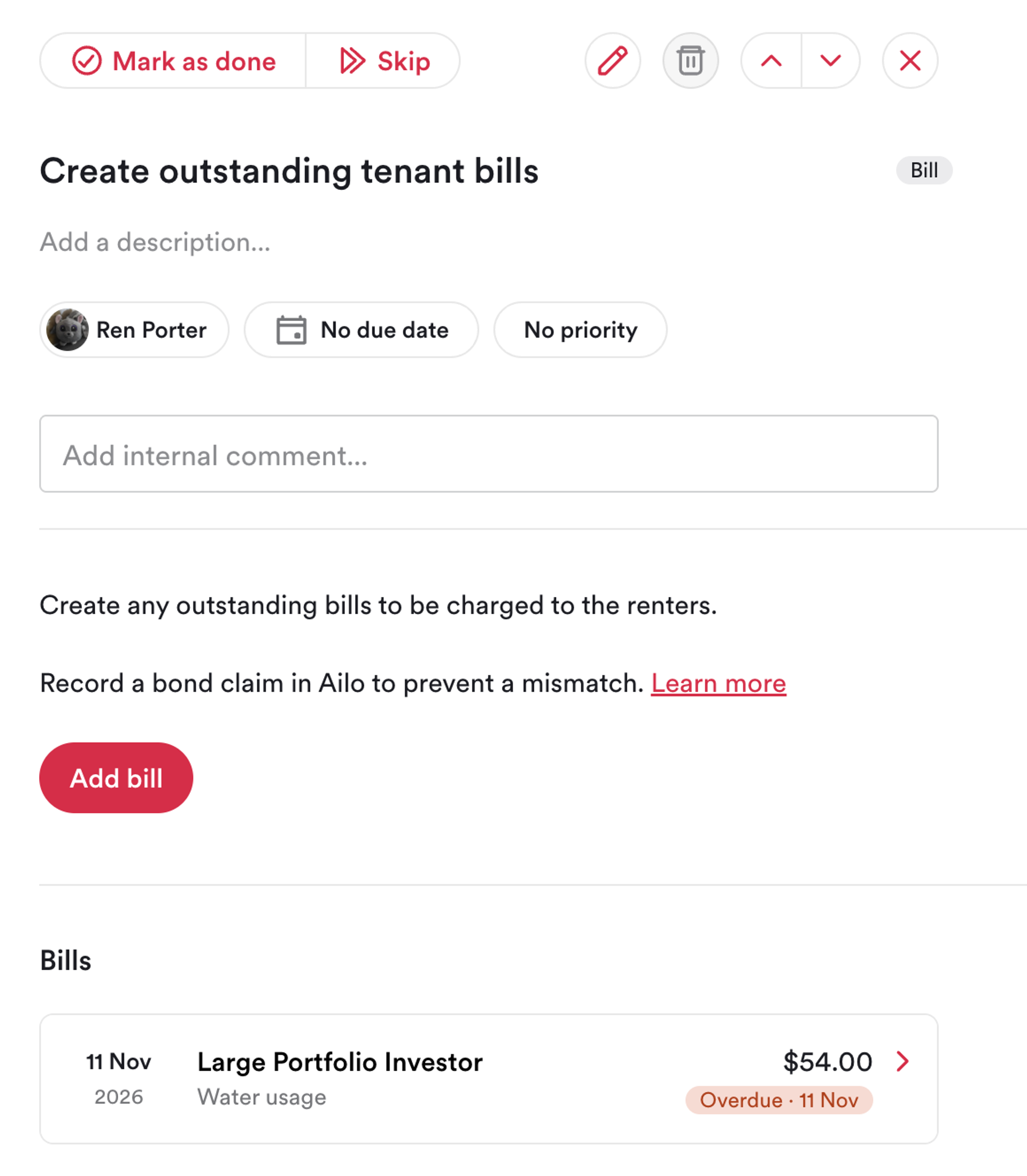
What: When you create a vacate tenancy project, the Outstanding bills action now shows bills that are already due on the tenancy.
Why: You see everything still owing before the renter moves out, so nothing gets missed and you don't create the same bill twice.
How: Start a vacate tenancy project as usual and open the Outstanding bills action. Existing due bills for the tenancy are listed there, ready to work through.
