
25.11.26 | Release Notes

Ailo
25 November 2026
What's New in Ailo
25.11.26
Refund Personal Account payments yourself

What: You can now refund rent, bills and deposits paid through a Personal Account, the same way you already refund card and bank payments.
Why: Until now, refunding a Personal Account payment meant contacting Ailo Support, and the renter had to wait. Now you can sort out overpayments, double payments and payment errors yourself in just a few clicks, and the money goes straight back to the renter's own bank account.
How: For rent, open the tenancy, select the payment and choose Refund. You can refund all of it or part of it, and come back later to refund more. For a bill, open it, select Manage, then Refund bill. A deposit can be refunded from the Collect initial payment action in a New tenancy project while the deposit is still unreleased. You'll need Finance Manage permission.
Refunds always go back to the account the renter paid from, so there's no destination to choose. Depending on the renter's bank, a refund can take up to 2 business days to arrive. The usual rules for which bills and deposits can be refunded still apply, and payments show as Paid by Bank Transfer (Personal Account) in statements and tenancy history.
See renewals, lettings and missed fees month by month

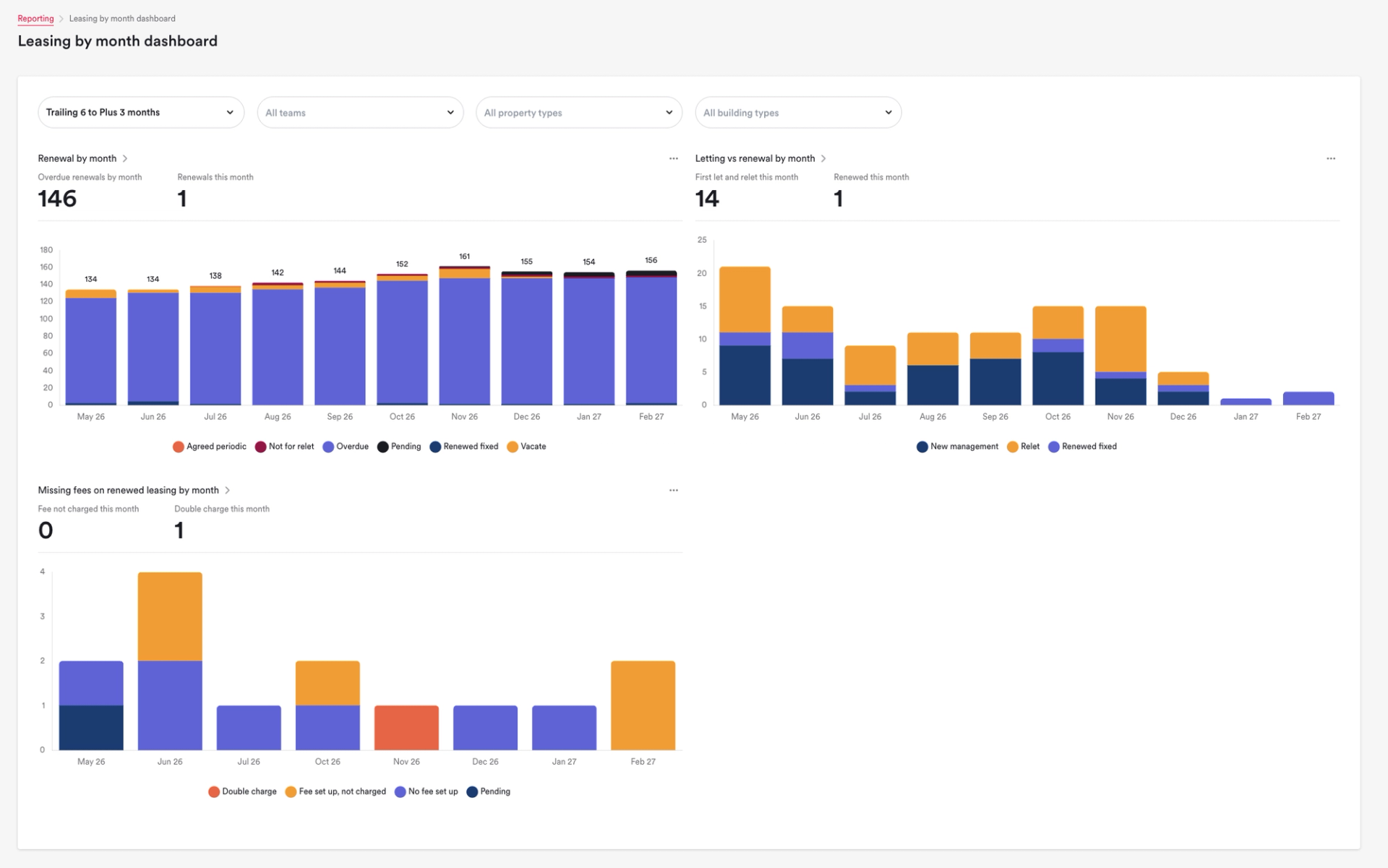
What: A new Leasing by month dashboard shows your renewals, new lettings and renewal fees month by month, with up to six months of renewals ahead.
Why: Renewals and new lettings are two of your agency's main sources of income, and both are easy to let slip. Now you can spot leases that have passed their end date with no new lease in place, plan renewals months ahead, and catch renewal fees that were never charged or were charged twice. No more exporting data and building your own spreadsheets.
How: Go to Reporting > Performance and open the Leasing by month dashboard. It has three reports: Renewals by month, Lettings vs renewals by month, and Missing fees on renewed leases. Select any month to see the leases behind the numbers, including property, team, status, new lease dates, rent and whether a renewal fee was charged. Filter by team, building type and property type, then search or download the list.
Shoutout to Hayden, Swan Hill for asking to see lease renewals further ahead, so Victorian offices can plan rent reviews with plenty of notice.
Track message response times over time

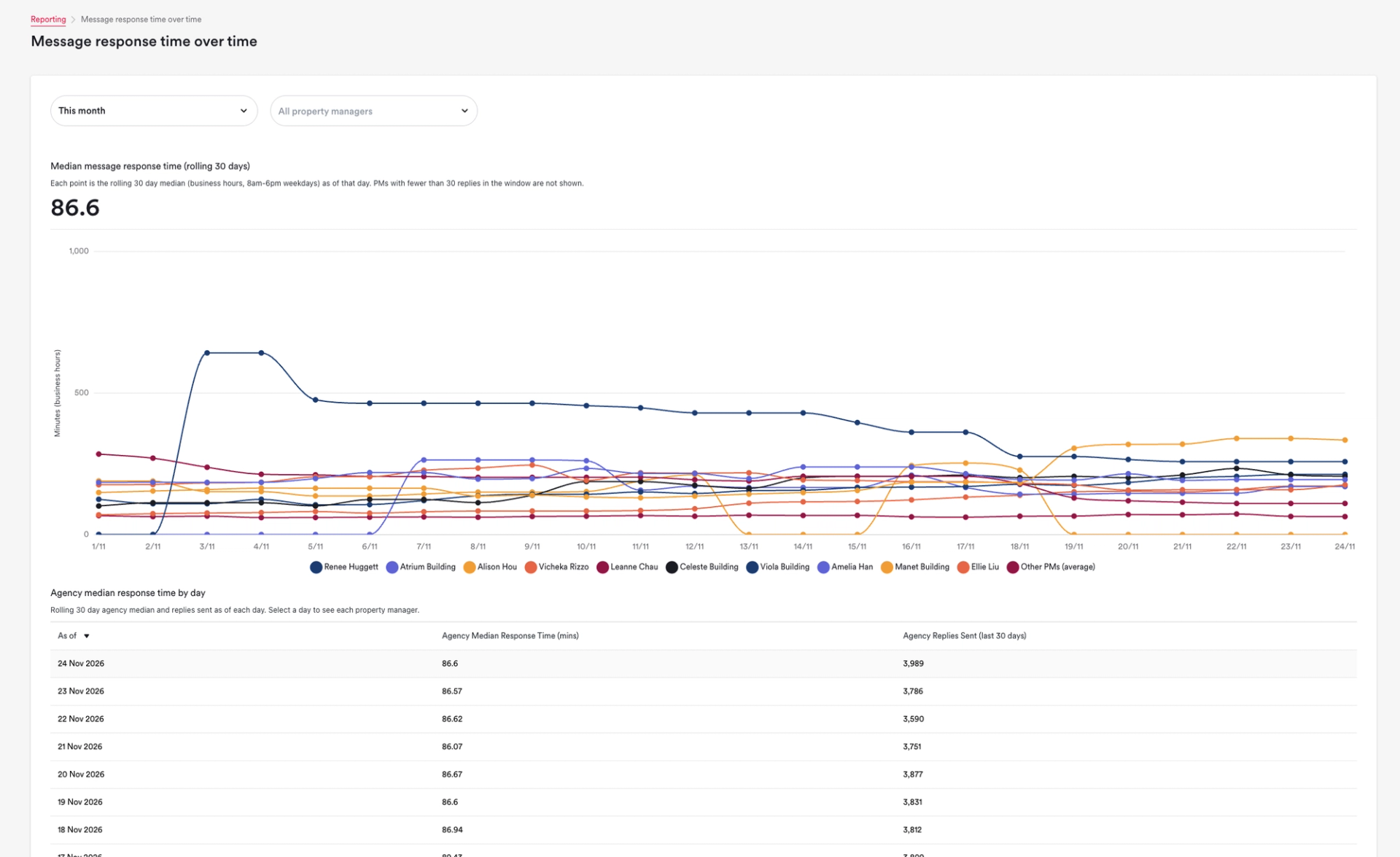
What: A new Message response time over time report shows how quickly your agency and each property manager reply to messages, day by day.
Why: How quickly you reply is one of the clearest signs of service that renters and investors notice. Instead of only seeing today's figure, you can now see how response times are trending, who replies quickly, and who might need some support.
How: Go to Reporting > Performance > Message response time over time. The chart shows the 30-day median response time for your agency and each property manager. Select a date to see each property manager's median response time and replies sent, with replies grouped by response time from under 15 minutes through to over 24 hours. You can also click the response time leaderboard on the My achievements card in Portfolio insights to jump straight to the latest day.
Response times count business hours only (8am to 6pm on weekdays, in your agency's timezone). A property manager needs at least 30 replies in the last 30 days before a figure shows, so a handful of messages never paints someone as slow.
